Knowledge Base FAQ
Expert answers on protocol internals, privacy, payment logic, and the remote sandbox
⚡ Smart Protocols & Traffic Routing
⭐How do I choose between all these protocols? What if I can't connect or it's laggy?
No manual selection needed.
The client features Smart Dual-Engine architecture. The engine constantly probes network conditions and seamlessly switches between the stealthy
💡 But what if you experience connection issues in extreme network conditions?
If the device is a computer, close the VPN client and restart the computer first — this usually resolves it. If problems persist, try these steps:
① If your current connection is Hy2 and you need traffic control rules: In the dashboard, enable any blocking target under "Firewall Rules", then restart the client. The system will automatically switch to the more stable VLESS protocol.
② If your current connection is VLESS and it feels slow: In the dashboard, remove all traffic control rules (Domain Blocking, Philippines Unlock, etc.), then restart the client. Removing the extra routing overhead and restoring Hy2 privileges will noticeably improve speed.
Technical Explanation: To ensure accurate routing for "Philippines Global Unlock" and "Firewall Rules", enabling these advanced features in the dashboard will temporarily revoke the high-burst Hysteria-2 (UDP) protocol privileges at the system level, automatically downgrading to the more stable VLESS (TCP) protocol which supports complex routing. If you seek pure maximum speed, disable all traffic control rules and restart the client.
The client features Smart Dual-Engine architecture. The engine constantly probes network conditions and seamlessly switches between the stealthy
Reality protocol and the high-burst Hysteria-2 protocol. Just hit "Connect" — the system handles the rest.💡 But what if you experience connection issues in extreme network conditions?
If the device is a computer, close the VPN client and restart the computer first — this usually resolves it. If problems persist, try these steps:
① If your current connection is Hy2 and you need traffic control rules: In the dashboard, enable any blocking target under "Firewall Rules", then restart the client. The system will automatically switch to the more stable VLESS protocol.
② If your current connection is VLESS and it feels slow: In the dashboard, remove all traffic control rules (Domain Blocking, Philippines Unlock, etc.), then restart the client. Removing the extra routing overhead and restoring Hy2 privileges will noticeably improve speed.
Technical Explanation: To ensure accurate routing for "Philippines Global Unlock" and "Firewall Rules", enabling these advanced features in the dashboard will temporarily revoke the high-burst Hysteria-2 (UDP) protocol privileges at the system level, automatically downgrading to the more stable VLESS (TCP) protocol which supports complex routing. If you seek pure maximum speed, disable all traffic control rules and restart the client.
Where are your servers located?
We operate 5 core acceleration regions spanning Asia-Pacific, North America, and Europe:
🇺🇸 USA (Oregon) · 🇰🇷 South Korea (Seoul) · 🇯🇵 Japan (Tokyo) · 🇸🇬 Singapore · 🇩🇪 Germany (Frankfurt)
Plus a dedicated 🇵🇭 Philippines native residential IP link for seamless unlocking of Netflix, YouTube, and other strict global services.
💡 Selection tip: Network conditions vary by time of day. Log into your dashboard and tap "Test Latency" — the system will automatically find the fastest route for you.
🇺🇸 USA (Oregon) · 🇰🇷 South Korea (Seoul) · 🇯🇵 Japan (Tokyo) · 🇸🇬 Singapore · 🇩🇪 Germany (Frankfurt)
Plus a dedicated 🇵🇭 Philippines native residential IP link for seamless unlocking of Netflix, YouTube, and other strict global services.
💡 Selection tip: Network conditions vary by time of day. Log into your dashboard and tap "Test Latency" — the system will automatically find the fastest route for you.
Why is your Reality protocol so hard to detect?
Traditional VPN obfuscation is just a thin HTTP shell. Our Reality protocol, combined with our proprietary "Smart Gateway Camouflage" technology, actually runs a fully operational enterprise web portal on the server. This withstands any shallow or deep active probing (DPI) by the GFW, giving it an extremely high survival rate.
What does "Philippines Traffic Unlock" mean in the app?
This is an advanced server-side traffic routing feature.
When enabled, our servers inject routing rules that precisely divert traffic for Netflix, TikTok, and Shopee through our rare Philippines native Globe home broadband exit — without changing your current node.
💡 Advanced Needs: If you need to configure a separate Philippines native residential IP for your own devices or servers, please check out our independent sub-project: Dedicated Philippines IP (ip.xiexievpn.com).
When enabled, our servers inject routing rules that precisely divert traffic for Netflix, TikTok, and Shopee through our rare Philippines native Globe home broadband exit — without changing your current node.
💡 Advanced Needs: If you need to configure a separate Philippines native residential IP for your own devices or servers, please check out our independent sub-project: Dedicated Philippines IP (ip.xiexievpn.com).
⭐Is "Unlimited Data" really unlimited? Any hidden limits?
Yes, truly unlimited — zero data caps, no hidden throttling.
We impose no monthly, daily, or cumulative data quotas. You can use the service 24/7 non-stop — there is no "data exceeded" slowdown or auto-disconnect mechanism.
Supports 2 concurrent devices (Fair Use Policy). To prevent malicious account sharing and ensure pure, blazing-fast system resources, we limit each account to a maximum of 2 devices online simultaneously. This perfectly covers the standard "Phone + PC" personal use case.
Hardcore bandwidth guarantee. Each connection is allocated a physically isolated bandwidth lane via Linux Smart QoS. You are guaranteed a 25Mbps dedicated lane during peak hours, with instant bursts up to 100Mbps. This isn't punitive throttling — it's fair resource scheduling to ensure every online user can stream 4K video without drops.
💡 In short: Unlimited data, 2 concurrent devices, guaranteed bandwidth, never secretly throttled.
We impose no monthly, daily, or cumulative data quotas. You can use the service 24/7 non-stop — there is no "data exceeded" slowdown or auto-disconnect mechanism.
Supports 2 concurrent devices (Fair Use Policy). To prevent malicious account sharing and ensure pure, blazing-fast system resources, we limit each account to a maximum of 2 devices online simultaneously. This perfectly covers the standard "Phone + PC" personal use case.
Hardcore bandwidth guarantee. Each connection is allocated a physically isolated bandwidth lane via Linux Smart QoS. You are guaranteed a 25Mbps dedicated lane during peak hours, with instant bursts up to 100Mbps. This isn't punitive throttling — it's fair resource scheduling to ensure every online user can stream 4K video without drops.
💡 In short: Unlimited data, 2 concurrent devices, guaranteed bandwidth, never secretly throttled.
Can I use BitTorrent (BT) or P2P traffic through the VPN?
Not supported. To comply with international network regulations and protect server IPs from DMCA copyright complaints and abuse, BitTorrent and P2P protocols are strictly disabled across our VPN tunnels and residential exits (automatically blocked by our firewall).
We recommend using our accelerator and remote browser for legitimate cross-border e-commerce, global social media operations, high-definition streaming, and academic research.
We recommend using our accelerator and remote browser for legitimate cross-border e-commerce, global social media operations, high-definition streaming, and academic research.
🌐 Cloud Sandbox (Remote Browser)
If I manually destroy the remote browser while uploading or downloading files, will my data be affected?NEW
Not affected at all!
Your exclusive private cloud drive operates independently of the web browser. You can close the web page or click [Destroy Container] to completely end your remote desktop session, and your saved work files and assets will remain completely intact.
All files are securely stored in your exclusive 250GB Private Cloud Drive. Unless you manually delete them or your random code (VPN account) completely expires, your data will be safely preserved.
Your exclusive private cloud drive operates independently of the web browser. You can close the web page or click [Destroy Container] to completely end your remote desktop session, and your saved work files and assets will remain completely intact.
All files are securely stored in your exclusive 250GB Private Cloud Drive. Unless you manually delete them or your random code (VPN account) completely expires, your data will be safely preserved.
Can the remote browser upload and download files? NEW
Yes, fully open now.
Breaking the last barrier of cloud environment isolation. To meet both cross-border e-commerce and daily productivity needs, you can now directly upload local image assets securely to the cloud, or quickly transfer cloud-downloaded reports and creative assets back to your local PC.
Breaking the last barrier of cloud environment isolation. To meet both cross-border e-commerce and daily productivity needs, you can now directly upload local image assets securely to the cloud, or quickly transfer cloud-downloaded reports and creative assets back to your local PC.
What's the difference between "Philippines Unlock" and the Remote Browser?
Philippines Unlock (VPN layer): Routes specific domains through Philippines exit. But your local GPU still renders the page, so hardware fingerprints (Canvas/WebGL) may still be exposed to risk-control systems.
Remote Browser (Physical layer): A complete cloud VM runs on our servers. All browsing computation is done in the cloud — your device only receives an encrypted video stream — achieving true 100% hardware fingerprint physical isolation.
Remote Browser (Physical layer): A complete cloud VM runs on our servers. All browsing computation is done in the cloud — your device only receives an encrypted video stream — achieving true 100% hardware fingerprint physical isolation.
How do I reduce remote browser mouse latency?
Click "Test Latency" in your dashboard to check all nodes and connect to the lowest-ping node (Japan/Korea/Singapore often best).
💡 Hardware Power: Our cloud servers are equipped with NVIDIA RTX 5090 for real-time hardware stream encoding (NVIDIA NVENC technology). With 60FPS adaptive quality streaming, remote rendering latency is compressed to single-digit milliseconds — delivering a crisp, smooth experience far beyond cheap CPU-based software encoding.
💡 Hardware Power: Our cloud servers are equipped with NVIDIA RTX 5090 for real-time hardware stream encoding (NVIDIA NVENC technology). With 60FPS adaptive quality streaming, remote rendering latency is compressed to single-digit milliseconds — delivering a crisp, smooth experience far beyond cheap CPU-based software encoding.
What is Tor mode vs. regular remote browser?
Tor Mode (Onion Network): Multi-layer encrypted routing through onion network. Traffic is forced through at least 3 random global relay nodes. Even if the server is seized, tracing back is impossible — ideal for extreme privacy scenarios.
Standard Mode: Direct high-speed overseas exit, faster response (supports smooth HD video). Privacy is based on our complete physical container isolation.
Standard Mode: Direct high-speed overseas exit, faster response (supports smooth HD video). Privacy is based on our complete physical container isolation.
Do I need to install any plugin to use the remote browser?
Zero installation required.
This is a pure web service. Whether you're on a restricted corporate network or a borrowed public device, just open a browser, click "Wake Up", and your sandbox is instantly ready. Close the tab and all browsing traces are incinerated, but downloaded files are safely kept in your private cloud drive.
This is a pure web service. Whether you're on a restricted corporate network or a borrowed public device, just open a browser, click "Wake Up", and your sandbox is instantly ready. Close the tab and all browsing traces are incinerated, but downloaded files are safely kept in your private cloud drive.
🔐 Account & Ultimate Privacy
⭐I lost my random code — can I recover it?
No. Absolutely impossible.
Our system embodies the "burn-after-reading" philosophy. After payment and account creation, to guarantee absolute privacy, the system automatically purges all payment order records. We have no database of contact information — recovery is physically impossible.
Treat your random code like a master password — write it down and keep it safe.
Our system embodies the "burn-after-reading" philosophy. After payment and account creation, to guarantee absolute privacy, the system automatically purges all payment order records. We have no database of contact information — recovery is physically impossible.
Treat your random code like a master password — write it down and keep it safe.
Why does Xiexie recommend Monero (XMR) payment?
Monero is the only truly untraceable cryptocurrency. Unlike Bitcoin/USDT with their public ledgers, XMR cryptographically hides sender, receiver, and amount at the protocol level.
Combined with our no-email registration, XMR payment enables a complete 100% anonymous identity loop.
How to obtain it: Prefer getting XMR via non-custodial decentralized apps like Haveno and Bisq, and avoid leaving identity-linkable trails on custodial centralized platforms.
Combined with our no-email registration, XMR payment enables a complete 100% anonymous identity loop.
How to obtain it: Prefer getting XMR via non-custodial decentralized apps like Haveno and Bisq, and avoid leaving identity-linkable trails on custodial centralized platforms.
📱 Devices & Compatibility
Does it support Kindle and E-ink devices?
Native support, perfect compatibility.
When the system detects Kindle Oasis / Boox or similar e-ink devices accessing the dashboard or browser, it auto-activates "Minimal Reading Mode": all CSS animations disabled, color gradients stripped, high-contrast pure black-and-white UI — smooth and readable even on low-refresh e-ink screens.
When the system detects Kindle Oasis / Boox or similar e-ink devices accessing the dashboard or browser, it auto-activates "Minimal Reading Mode": all CSS animations disabled, color gradients stripped, high-contrast pure black-and-white UI — smooth and readable even on low-refresh e-ink screens.
⭐Can I use third-party clients like Clash or V2rayNG instead of your official app?
Absolutely — we natively support standard subscription links.
Log into your dashboard and copy your personal subscription link from the "Subscription" section. Paste it into any VLESS / Hysteria 2 compatible client — including but not limited to V2rayNG, Clash Meta (mihomo), Shadowrocket, NekoBox, Hiddify, and more.
The subscription link auto-delivers all available nodes and the latest configurations — you get the exact same routes and speeds as the official client.
💡 Note: When using third-party clients, advanced features like "Smart Dual-Engine Auto-Switch" and "Philippines Unlock" need to be managed manually from the dashboard. Some clients may not support all features. We recommend the official client for the complete experience.
Log into your dashboard and copy your personal subscription link from the "Subscription" section. Paste it into any VLESS / Hysteria 2 compatible client — including but not limited to V2rayNG, Clash Meta (mihomo), Shadowrocket, NekoBox, Hiddify, and more.
The subscription link auto-delivers all available nodes and the latest configurations — you get the exact same routes and speeds as the official client.
💡 Note: When using third-party clients, advanced features like "Smart Dual-Engine Auto-Switch" and "Philippines Unlock" need to be managed manually from the dashboard. Some clients may not support all features. We recommend the official client for the complete experience.
💡 Tips & Design Philosophy
⭐The app auto-logged me in. How do I switch to a different random code?NEW
Once the official client's auto-login triggers, it keeps the current account active. To switch to a different random code, follow these steps:
① Temporarily disconnect your device from the local network (turn off Wi-Fi / unplug the cable)
② Reopen the client and enter the new random code, then tap Login
③ Since the network is disconnected, the old auto-login credential will automatically expire
④ Reconnect your network — the client will complete login with the new random code
💡 How it works: Disconnecting prevents the old credential from auto-renewing, resetting the client to a "first login" state. Once the network is back, the new code takes effect immediately.
① Temporarily disconnect your device from the local network (turn off Wi-Fi / unplug the cable)
② Reopen the client and enter the new random code, then tap Login
③ Since the network is disconnected, the old auto-login credential will automatically expire
④ Reconnect your network — the client will complete login with the new random code
💡 How it works: Disconnecting prevents the old credential from auto-renewing, resetting the client to a "first login" state. Once the network is back, the new code takes effect immediately.
Can traffic control and the remote browser only be enabled via the web dashboard?NEW
Yes — all advanced features are managed from the web dashboard.
Traffic Control (Domain Blocking / Philippines Unlock): After enabling it in the dashboard, simply restart the client to apply the changes. No additional steps needed in the client itself.
Remote Browser: Can only be activated via the "Wake Up" button in the web dashboard.
💡 Design Philosophy: Centralizing advanced management on the web keeps the client minimal — this isn't laziness, it's a deliberate product decision. A streamlined client lowers the barrier for new users and dramatically reduces maintenance complexity across three platforms (Windows/Linux/Android). Simplicity is our core product philosophy.
Traffic Control (Domain Blocking / Philippines Unlock): After enabling it in the dashboard, simply restart the client to apply the changes. No additional steps needed in the client itself.
Remote Browser: Can only be activated via the "Wake Up" button in the web dashboard.
💡 Design Philosophy: Centralizing advanced management on the web keeps the client minimal — this isn't laziness, it's a deliberate product decision. A streamlined client lowers the barrier for new users and dramatically reduces maintenance complexity across three platforms (Windows/Linux/Android). Simplicity is our core product philosophy.
🛡️ Trust & Transparency
Why does a VPN service need RTX 5090 GPUs? Isn't VPN just about bandwidth?
The GPU is NOT used for VPN traffic routing.
Our core differentiator is the Cloud Sandbox (Remote Browser) — a full isolated virtual desktop running on our overseas servers. To deliver a smooth, lag-free remote desktop experience to your screen, the server must perform real-time video stream encoding via NVIDIA NVENC (the same hardware encoder used by professional live-streamers and cloud gaming platforms).
It's like asking a hospital "why do you need a CT scanner?" — because diagnosis and prescriptions are two different things. "VPN bandwidth routing" and "cloud desktop GPU rendering" are two entirely different technology layers.
Our core differentiator is the Cloud Sandbox (Remote Browser) — a full isolated virtual desktop running on our overseas servers. To deliver a smooth, lag-free remote desktop experience to your screen, the server must perform real-time video stream encoding via NVIDIA NVENC (the same hardware encoder used by professional live-streamers and cloud gaming platforms).
It's like asking a hospital "why do you need a CT scanner?" — because diagnosis and prescriptions are two different things. "VPN bandwidth routing" and "cloud desktop GPU rendering" are two entirely different technology layers.
Can Xiexie VPN monitor my passwords, Google account, or bank details?
Technically impossible.
In 2026, virtually 100% of sensitive websites (Google, banks, payment platforms) enforce HTTPS / TLS 1.3 end-to-end encryption. Even if a proxy node wanted to intercept your traffic, all it would see is a stream of irreversibly encrypted gibberish — no passwords, no session tokens, no plaintext of any kind.
Furthermore, our entire identity model is designed to be the opposite of a surveillance platform:
• No email required — registration uses only a random code.
• Monero (XMR) payment — the world's only truly untraceable cryptocurrency.
• Burn-after-reading — payment records are automatically purged after account creation.
💡 In short: We don't collect your identity, we can't read your encrypted traffic, and our payment method is specifically chosen to be impossible to trace. This is the exact opposite of "monitoring."
In 2026, virtually 100% of sensitive websites (Google, banks, payment platforms) enforce HTTPS / TLS 1.3 end-to-end encryption. Even if a proxy node wanted to intercept your traffic, all it would see is a stream of irreversibly encrypted gibberish — no passwords, no session tokens, no plaintext of any kind.
Furthermore, our entire identity model is designed to be the opposite of a surveillance platform:
• No email required — registration uses only a random code.
• Monero (XMR) payment — the world's only truly untraceable cryptocurrency.
• Burn-after-reading — payment records are automatically purged after account creation.
💡 In short: We don't collect your identity, we can't read your encrypted traffic, and our payment method is specifically chosen to be impossible to trace. This is the exact opposite of "monitoring."
Are your clients open-source? Can I audit the code? NEW
Yes — 100% open-source across all platforms, fully transparent.
The complete source code for our Windows, Linux, and Android clients is publicly hosted on GitHub. Anyone — security researchers, developers, or everyday users — can freely audit every single line of code to confirm:
• No backdoors — zero hidden data exfiltration or telemetry code.
• No malicious behavior — connection logic and encryption implementation are fully transparent and verifiable.
• Build it yourself — if you don't trust pre-compiled binaries, you can build the client directly from source.
📦 GitHub Repositories:
• Windows Client Source
• Linux Client Source
• Android Client Source
💡 In short: We don't just promise "we don't spy" — we lay the code bare for you to see. This is the most hardcore answer to user trust.
The complete source code for our Windows, Linux, and Android clients is publicly hosted on GitHub. Anyone — security researchers, developers, or everyday users — can freely audit every single line of code to confirm:
• No backdoors — zero hidden data exfiltration or telemetry code.
• No malicious behavior — connection logic and encryption implementation are fully transparent and verifiable.
• Build it yourself — if you don't trust pre-compiled binaries, you can build the client directly from source.
📦 GitHub Repositories:
• Windows Client Source
• Linux Client Source
• Android Client Source
💡 In short: We don't just promise "we don't spy" — we lay the code bare for you to see. This is the most hardcore answer to user trust.
Why is it so cheap? Is it oversold? NEW
Not oversold — the cost structure is completely different.
We use a HomeLab (private physical server room) model: the founder is a hardcore tech geek living in Manila, Philippines, with server hardware (including the RTX 5090, which doubles as his personal media and gaming center) deployed in his own apartment, connected to Globe gigabit home fiber.
Compared to the thousands of dollars per month traditional VPN providers spend on commercial data center hosting, we've eliminated the biggest cost — your payment goes directly into operating the actual physical machines. That's why our pricing is far below the industry average, while still offering features like physical sandbox and native residential IP that are typically reserved for high-end VPN services. 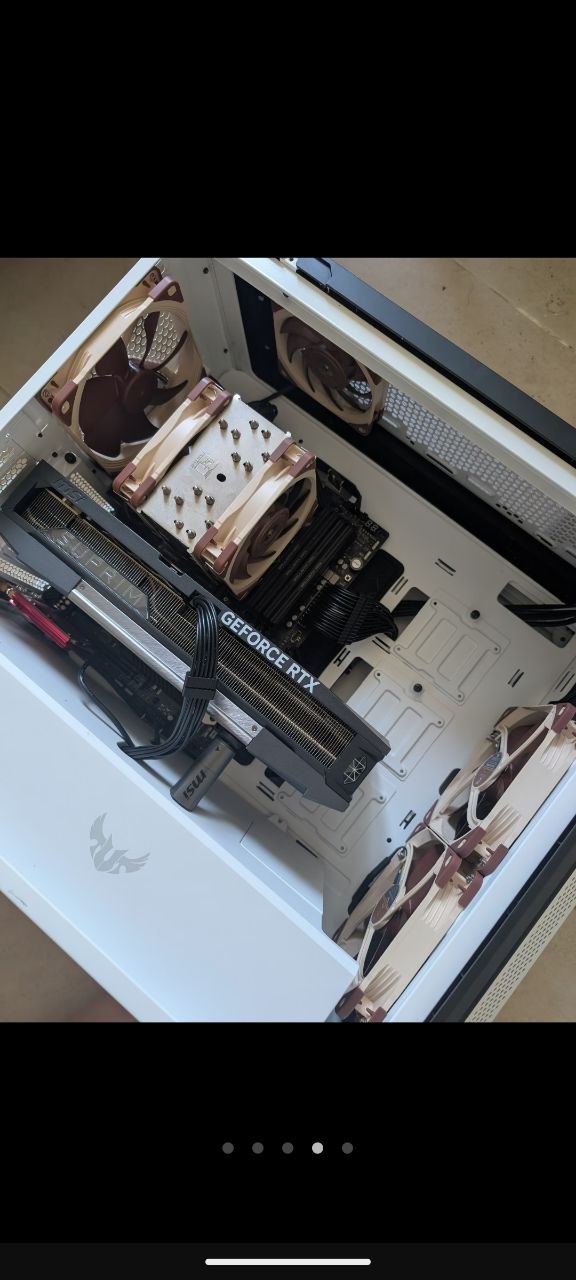

We use a HomeLab (private physical server room) model: the founder is a hardcore tech geek living in Manila, Philippines, with server hardware (including the RTX 5090, which doubles as his personal media and gaming center) deployed in his own apartment, connected to Globe gigabit home fiber.
Compared to the thousands of dollars per month traditional VPN providers spend on commercial data center hosting, we've eliminated the biggest cost — your payment goes directly into operating the actual physical machines. That's why our pricing is far below the industry average, while still offering features like physical sandbox and native residential IP that are typically reserved for high-end VPN services.
HomeLab Node Photo (with RTX 5090)
Founder's Philippines Permanent Residence Proof